今天做了一下微信的登录和微信小程序支付,其中遇到了几个问题,现在说明一下解决的方法~~
小程序登录 openid 获取问题
这个是官方文档给出的根据code来获取openid的链接:
$url = 'https://api.weixin.qq.com/sns/oauth2/access_token?appid='.$appid.'&secret='.$appsecret.'&code='.$code.'&grant_type=authorization_code';
而我在使用该链接,进行openid请求时,出现了请求繁忙的错误(返回了错误代码),问了一下,发现使用下面这个链接可以正常的请求到数据:
$url = 'https://api.weixin.qq.com/sns/jscode2session?appid='.$appid.'&secret='.$appsecret.'&js_code='.$code.'&grant_type=authorization_code';
小程序支付
我这里使用的是uniapp做的前端,其中uniapp给了一个API:
// 仅作为示例,非真实参数信息。
uni.requestPayment({
    provider: 'wxpay',
    timeStamp: String(Date.now()),
    nonceStr: 'A1B2C3D4E5',
    package: 'prepay_id=wx20180101abcdefg',
    signType: 'MD5',
    paySign: '',
    success: function (res) {
        console.log('success:' + JSON.stringify(res));
    },
    fail: function (err) {
        console.log('fail:' + JSON.stringify(err));
    }
});
其中,timeStamp、nonceStr、package、signType(这个默认MD5就好)、paySign都是需要后端返回的,所谓的后端返回,即需要将相应的参数去请求微信给的统一下单接口来获取(timeStamp、nonceStr这两个值都是后端直接生成的),网上找了一下后端的代码,稍微改了一下,拿来就可以使用了,其中openid是需要填写的,金额的话单位是元,填好相对应的信息之后,然后我们将返回前端的数据填入上面的请求中:
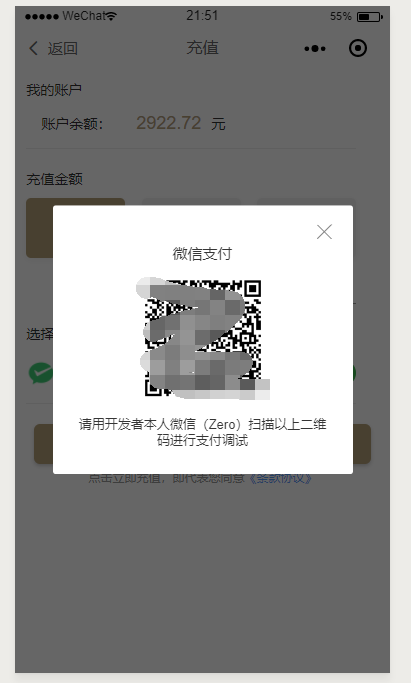
微信支付演示(这是在微信开发工具中展示)
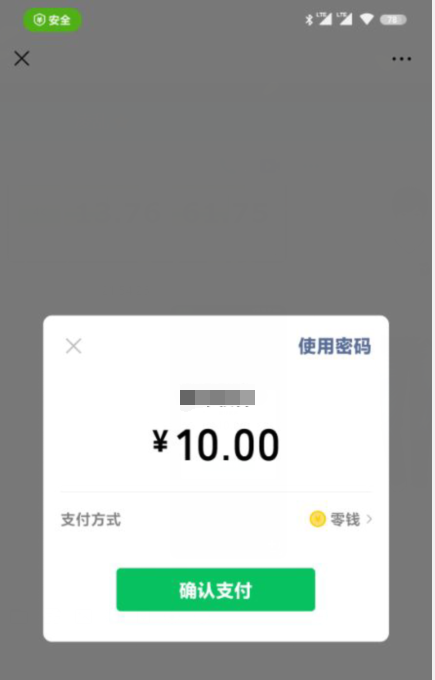
手机微信扫码

扫码支付显示 这里就不展示支付成功的页面了 哈哈哈
<?php

$pay = new wxMpPay("appid","商户号","https://fzxywl.cn","支付key","支付人的openid","支付时显示的文字","订单号","金额");

$pay->Pay();

/**
 * 微信小程序支付
 *
 */

class wxMpPay
{
    //公众账号ID
    private $appid;
    //商户号
    private $mch_id;
    //通知回调地址
    private $notify_url;
    //支付密钥
    private $key;
    //用户的openid
    private $openid;
    // 显示的订单名称
    private $body;
    // 订单号
    private $out_trade_no;
    // 订单金额 单位元
    private $fee;

    public function __construct($appid, $mch_id, $notify_url, $key, $openid, $body, $out_trade_no, $fee)
    {
        $this->appid = $appid;
        $this->mch_id = $mch_id;
        $this->notify_url = $notify_url;
        $this->key = $key;
        $this->openid = $openid;
        $this->body = $body;
        $this->out_trade_no = $out_trade_no;
        $this->fee = $fee;
    }
    public function Pay()
    {
        $fee = $this->fee; // 金额
        $openid = $this->openid;
        $appid = $this->appid; //这里写小程序AddId
        $body = $this->body; //这个自己写,微信订单里面显示的是商品名称
        $mch_id = $this->mch_id;
        $nonce_str = $this->nonce_str(); //随机字符串
        $notify_url = $this->notify_url;
        $out_trade_no = $this->out_trade_no; //商户订单号
        $spbill_create_ip = $_SERVER['REMOTE_ADDR'];
        $total_fee = $fee * 100; //因为充值金额最小是1 而且单位为分 如果是充值1元所以这里需要*100
        $trade_type = 'JSAPI'; //交易类型 默认
        //这里是按照顺序的 因为下面的签名是按照顺序 排序错误 肯定出错
        $post['appid'] = $appid;
        $post['body'] = $body;
        $post['mch_id'] = $mch_id;
        $post['nonce_str'] = $nonce_str; //随机字符串
        $post['notify_url'] = $notify_url;
        $post['openid'] = $openid;
        $post['out_trade_no'] = $out_trade_no;
        $post['spbill_create_ip'] = $spbill_create_ip; //终端的ip
        $post['total_fee'] = $total_fee; //总金额 最低为一块钱 必须是整数
        $post['trade_type'] = $trade_type;
        $sign = $this->sign($post); //签名
        $post_xml = '<xml>
               <appid>' . $appid . '</appid>
               <body>' . $body . '</body>
               <mch_id>' . $mch_id . '</mch_id>
               <nonce_str>' . $nonce_str . '</nonce_str>
               <notify_url>' . $notify_url . '</notify_url>
               <openid>' . $openid . '</openid>
               <out_trade_no>' . $out_trade_no . '</out_trade_no>
               <spbill_create_ip>' . $spbill_create_ip . '</spbill_create_ip>
               <total_fee>' . $total_fee . '</total_fee>
               <trade_type>' . $trade_type . '</trade_type>
               <sign>' . $sign . '</sign>
            </xml> ';
        //统一接口prepay_id
        $url = 'https://api.mch.weixin.qq.com/pay/unifiedorder';
        $xml = $this->http_request($url, $post_xml);
        $array = $this->xml($xml); //全要大写
        if ($array['RETURN_CODE'] == 'SUCCESS' && $array['RESULT_CODE'] == 'SUCCESS') {
            $time = time();
            $tmp = ''; //临时数组用于签名
            $tmp['appId'] = $appid;
            $tmp['nonceStr'] = $nonce_str;
            $tmp['package'] = 'prepay_id=' . $array['PREPAY_ID'];
            $tmp['signType'] = 'MD5';
            $tmp['timeStamp'] = "$time";
            $data['state'] = 1;
            $data['timeStamp'] = "$time"; //时间戳
            $data['nonceStr'] = $nonce_str; //随机字符串
            $data['signType'] = 'MD5'; //签名算法,暂支持 MD5
            $data['package'] = 'prepay_id=' . $array['PREPAY_ID']; //统一下单接口返回的 prepay_id 参数值,提交格式如:prepay_id=*
            $data['paySign'] = $this->sign($tmp); //签名,具体签名方案参见微信公众号支付帮助文档;
            $data['out_trade_no'] = $out_trade_no;

        } else {
            $data['state'] = 0;
            $data['text'] = "错误";
            $data['RETURN_CODE'] = $array['RETURN_CODE'];
            $data['RETURN_MSG'] = $array['RETURN_MSG'];
        }
        echo json_encode($data);
    }

    //随机32位字符串
    private function nonce_str()
    {
        $result = '';
        $str = 'QWERTYUIOPASDFGHJKLZXVBNMqwertyuioplkjhgfdsamnbvcxz';
        for ($i = 0; $i < 32; $i++) {
            $result .= $str[rand(0, 48)];
        }
        return $result;
    }

    //生成订单号
    private function order_number($openid)
    {
        //date('Ymd',time()).time().rand(10,99);//18位
        return md5($openid . time() . rand(10, 99)); //32位
    }

    //签名 $data要先排好顺序
    private function sign($data)
    {
        $stringA = '';
        foreach ($data as $key => $value) {
            if (!$value) {
                continue;
            }

            if ($stringA) {
                $stringA .= '&' . $key . "=" . $value;
            } else {
                $stringA = $key . "=" . $value;
            }

        }
        $wx_key = $this->key;
        $stringSignTemp = $stringA . '&key=' . $wx_key; //申请支付后有给予一个商户账号和密码,登陆后自己设置key
        return strtoupper(md5($stringSignTemp));
    }

    //curl请求啊
    public function http_request($url, $data = null, $headers = array())
    {
        $curl = curl_init();
        if (count($headers) >= 1) {
            curl_setopt($curl, CURLOPT_HTTPHEADER, $headers);
        }
        curl_setopt($curl, CURLOPT_URL, $url);
        curl_setopt($curl, CURLOPT_SSL_VERIFYPEER, false);
        curl_setopt($curl, CURLOPT_SSL_VERIFYHOST, false);
        if (!empty($data)) {
            curl_setopt($curl, CURLOPT_POST, 1);
            curl_setopt($curl, CURLOPT_POSTFIELDS, $data);
        }
        curl_setopt($curl, CURLOPT_RETURNTRANSFER, 1);
        $output = curl_exec($curl);
        curl_close($curl);
        return $output;
    }

    //获取xml
    private function xml($xml)
    {
        $p = xml_parser_create();
        xml_parse_into_struct($p, $xml, $vals, $index);
        xml_parser_free($p);
        $data = "";
        foreach ($index as $key => $value) {
            if ($key == 'xml' || $key == 'XML') {
                continue;
            }

            $tag = $vals[$value[0]]['tag'];
            $value = $vals[$value[0]]['value'];
            $data[$tag] = $value;
        }
        return $data;
    }
}
该代码来自网络 原文地址 里面有回调代码 可以去看看
关于回调的问题
暂时没有写回调验证 哈哈哈